Hampton Bay Ceiling Fan Remote
A Hampton Bay ceiling fan remote talks to a receiver tucked inside the fan’s canopy. Get the two on the same code and most remotes work again. Find out which remote you have, match it, fix it, or pick a replacement.
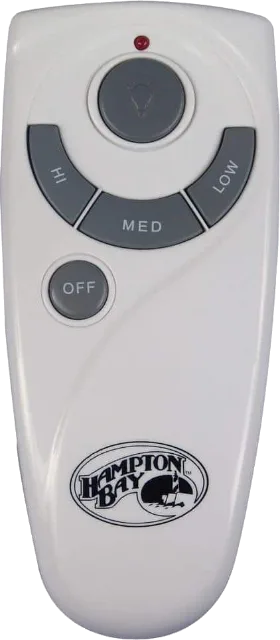
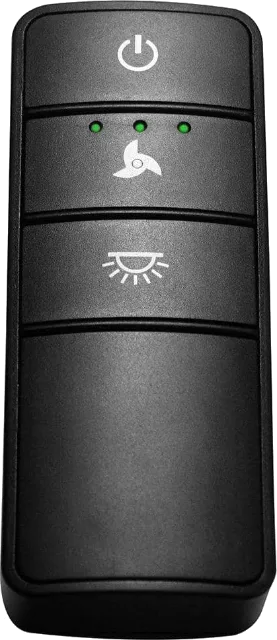
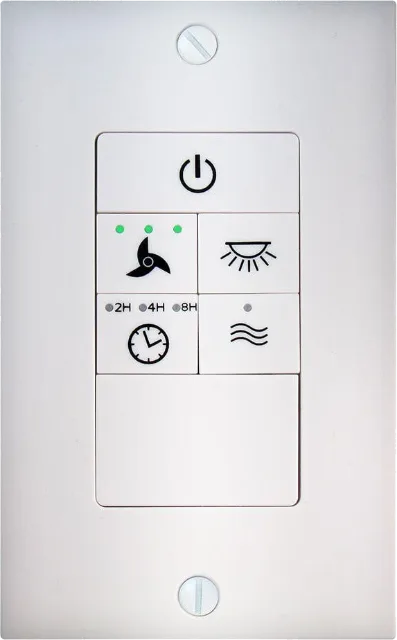
Which Hampton Bay remote do you have?
Turn it over and open the battery cover. What you find there tells you how it pairs.
Switch-code remote
Four tiny switches behind the battery cover set one of 16 codes. The receiver in the canopy has the same four, and both must match.
Pairs by matching switches
Learning remote
Many newer fans learn the remote instead. Follow the pairing steps in the manual; on some models the light blinks three times when it works.
Pairs by a pairing step
Smart or wall control
Hubspace smart fans pair in the Hubspace app. Wireless wall controls replace the handheld and run speed and light from the wall.
Pairs by app or its receiver
The code printed on the back of an older handheld, such as FAN-HD, UC7078T, CHQ7078T or UC7083T, is its FCC ID. Replacement makers list the IDs their remote stands in for, so match it before you buy.
Match the Hampton Bay remote code (DIP switches)
Set these to match yours. Turn the power off at the breaker before you lower the fan canopy to read the receiver.
Remote
Behind the battery cover.
Receiver
Inside the fan canopy, on the receiver box.
Switch 3 differs. Set both units the same.
4 switches, 16 possible codes
Two fans in one house on the same code will both answer one remote. Give each fan its own pattern.
Remote stopped responding? Check in this order
Most dead remotes come down to one of these five, and the first three cost nothing. The full fix list is on Hampton Bay ceiling fan remote not working.
Battery
Fit a fresh one of the type printed in the cover. The 70830 handheld takes an A23.
Wall switch
Leave the fan’s wall switch on. The receiver needs power to hear the remote.
Switch code
Remote and receiver DIP switches must match position for position.
Pairing
Learning remotes come paired from the factory. If one stops, pair it again.
Receiver
Still nothing? The receiver may have failed. Replace remote and receiver together.
Light works but the fan doesn’t, or the other way round? The remote is getting through, so see fan not working or fan light not working.
The Hampton Bay ceiling fan receiver and wall control
The receiver is the small box that takes the remote’s signal and switches the fan and light.
Where the receiver is
Inside the canopy, the cover that sits against the ceiling. Turn off the breaker, loosen the canopy and lower it to see the receiver box and its switches.
Take a photo of the wiring before you unplug anything.
Ceiling fan wiringReplacing the receiver
Hampton Bay’s replacement remotes come with their own receiver, so a dead receiver is fixed by fitting a new remote kit.
The 70830 and 98130 kits are not made for hugger or flush-mount fans.
See replacement kitsWireless wall control
The 98139 wall control runs speed and light dimming from the wall, plus a Comfort Breeze mode that varies the speed on its own.
It works with most major fan brands.
Check at Home DepotHampton Bay replacement remotes
Each kit below ships with a matching receiver, so it works even if the old remote is lost. Prices change often; each links to its live Home Depot page.
Hampton Bay also lists a white version of the dimming remote (99130), a basic on/off remote (98101) and a thermostatic remote with an LCD screen (98001).
Hampton Bay remote questions
Can I use any universal remote on a Hampton Bay fan?
A kit that includes its own receiver, such as Hampton Bay’s 98130, works on most downrod fans from major brands. A remote sold without a receiver has to match your existing receiver’s code style, so check the FCC ID on the back of your old remote first.
Where is the receiver in a Hampton Bay ceiling fan?
In the canopy against the ceiling. Turn off the breaker, loosen the canopy and lower it to see the receiver box.
What battery does a Hampton Bay fan remote take?
It depends on the remote; the type is printed inside the battery cover. The 70830 handheld takes an A23, and many older handhelds take a 9V.
How do I find my Hampton Bay remote code?
On switch-code remotes, the code is the up and down pattern of the four DIP switches behind the battery cover. It must match the four switches on the receiver. Use the switch matcher above.
How do I pair a Hampton Bay remote to a new fan?
Switch-code remotes pair by matching DIP switches. Learning remotes pair through a short sequence given in the fan’s manual. Pair or reset a Hampton Bay remote has both methods.
How many remotes can one Hampton Bay fan use?
Some newer Hampton Bay fans take up to three paired remotes. Extra remotes are ordered through Hampton Bay customer service at 1-855-HD-HAMPTON.
Is there a Hampton Bay ceiling fan remote app?
Smart Hampton Bay fans powered by Hubspace use the Hubspace app and work with Alexa and Google Assistant. Standard remote fans don’t have an app.
Will a replacement remote fit my Hampton Bay hugger fan?
Check before you buy. Home Depot lists both the 70830 and the 98130 kits as not made for hugger or flush-mount fans.
Where can I find my Hampton Bay remote manual?
Search the remote’s model number on homedepot.com and open Info and Guides. Fan manuals often cover the remote too; see Hampton Bay ceiling fan manuals.